How to Block Phishing Links
How to Block Phishing Links Before They Reach Your Employees
Your team gets an email that looks like it's from your CEO, your bank, or a trusted vendor. It has a link. Someone clicks it. That one click can lead to stolen passwords, a wire transfer to a criminal's account, or ransomware locking up your entire network.
If you're searching for how to block phishing links, you're already ahead of most businesses, because the truth is, most phishing attacks are preventable with the right email setup. This guide explains what phishing links actually are, why they keep getting through, and the one email security fix that stops the majority of them before they ever land in an inbox.
Check My Domain's DMARC Status →
What Are Phishing Links, and Why Are They So Dangerous?
A phishing link is a web address hidden inside an email, text message, or attachment that's designed to trick someone into giving up sensitive information. The link might lead to a fake login page that steals a password, or it might quietly install malware the moment it's clicked.
What makes phishing so effective isn't clever hacking. It's impersonation. Criminals don't need to break into your systems if they can just pretend to be someone you already trust, like your own domain, a coworker, or a well-known company.
Why Spam Filters Alone Aren't Enough
Most businesses assume their existing spam filter or antivirus software has phishing covered. Unfortunately, that's rarely true. Spam filters are good at catching obvious junk mail, but they struggle with a specific and increasingly common tactic: email spoofing.
Email spoofing is when an attacker sends a message that appears to come from your own company's domain, even though they don't actually control it. Because the email looks like it's from a legitimate, trusted source, it sails right past basic filters and lands in your employees' inboxes looking completely authentic.
This is the gap that a technical email standard called DMARC was built to close.
5 Ways Businesses Try to Stop Phishing (and Where They Fall Short)
Employee training. Teaching staff to spot suspicious emails helps, but it's not foolproof. Even well-trained employees fall for convincing fakes, especially when they're busy or distracted.
Spam filters. These catch bulk junk mail well but often miss targeted, well-disguised phishing attempts, particularly ones that spoof a trusted domain.
Multi-factor authentication (MFA). MFA adds a valuable extra login step, but it doesn't stop a phishing email from being sent or from impersonating your business in the first place.
Antivirus software. This can catch malicious attachments after they're downloaded, but it does nothing to prevent the phishing email from arriving or looking legitimate.
Manually reporting suspicious emails. Useful for damage control, but entirely reactive. By the time someone reports a phishing email, others may have already clicked it.
Each of these plays a role, but none of them close the biggest hole: nothing is stopping criminals from sending email that claims to be from your own domain.
The Real Fix: DMARC Email Authentication
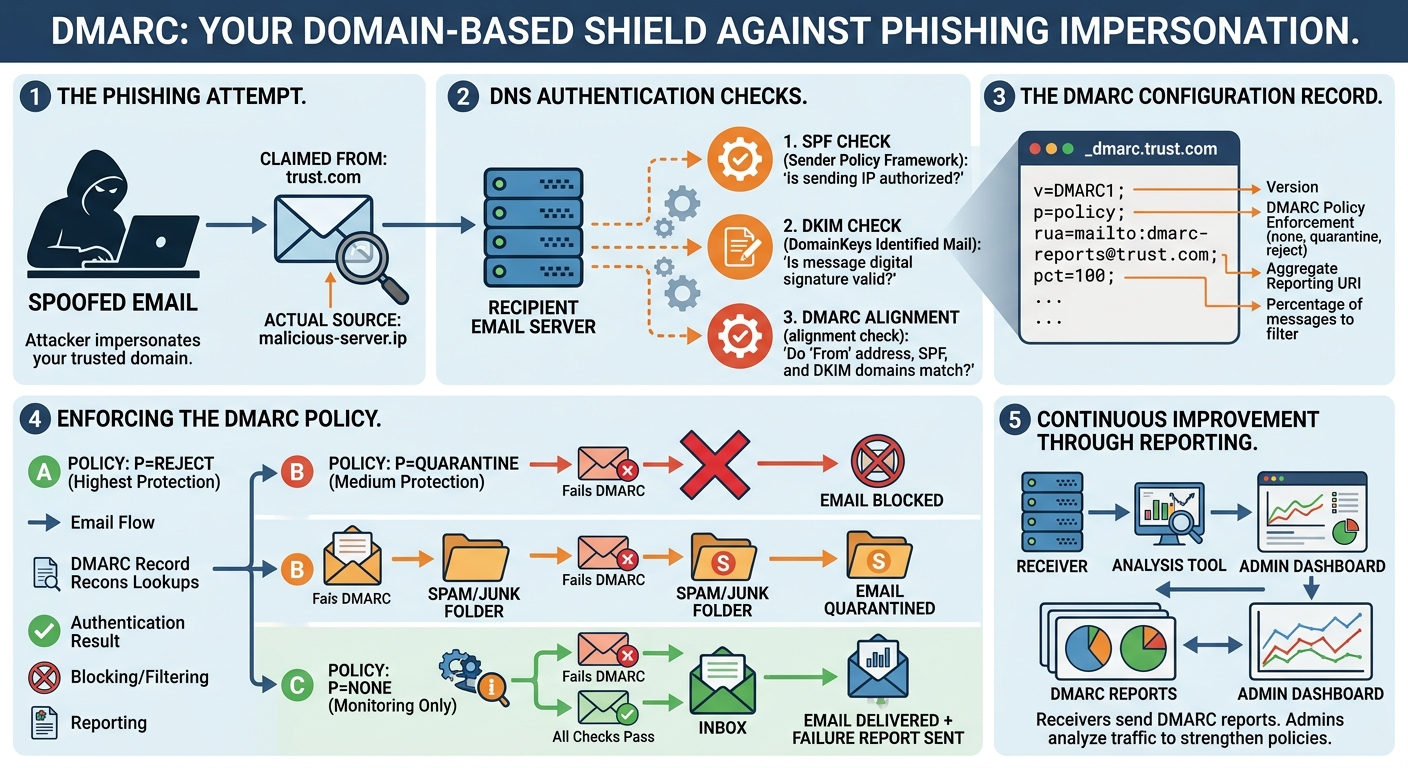
DMARC (which stands for Domain-based Message Authentication, Reporting, and Conformance) is a free email security standard that tells receiving mail servers, like Gmail or Outlook, exactly what to do with messages that try to impersonate your domain.
In plain terms: DMARC lets you tell the internet, "Only these specific servers are allowed to send email as my company. If a message claims to be from us but doesn't check out, reject it or send it straight to spam."
Once DMARC is properly configured, it becomes dramatically harder for a criminal to send a convincing phishing email that appears to come from your business, whether that's targeting your customers, your vendors, or your own employees.
What DMARC Actually Does
Verifies sender identity using two supporting records called SPF and DKIM
Tells email providers how to handle suspicious messages (allow, quarantine, or reject them)
Sends you reports showing who is sending email using your domain, including any impersonation attempts
Protects your brand reputation by keeping your domain off spam blacklists
Why DMARC Setup Often Goes Wrong
Here's the catch: DMARC is powerful, but it's also easy to configure incorrectly. A misconfigured DMARC record can accidentally block legitimate company emails, like invoices or newsletters, from being delivered at all. That's exactly why so many businesses either skip it entirely or set it up halfway and leave it stuck in monitoring mode, where it collects data but never actually blocks anything.
Getting real protection requires the record to be set up correctly and moved through its stages properly, from monitoring to full enforcement.
Not Sure If You're Protected? Find Out for Free
The fastest way to know where you stand is to check whether your domain even has a DMARC record in place, and if it does, whether it's actually configured to block impersonation or just quietly watching.
Run our free DMARC scan to see your domain's current phishing exposure in minutes. No obligation, no technical jargon, just a clear picture of whether criminals could be sending email pretending to be you right now.
Check My Domain's DMARC Status →
Frequently Asked Questions
How do I block phishing links from being sent using my company's name? The most effective method is configuring DMARC, along with its supporting SPF and DKIM records, which tells email providers to reject messages that falsely claim to come from your domain.
Is DMARC free to set up? Yes. DMARC is a free, open email standard. The setup does require some technical configuration, which is where many businesses choose to get expert help to avoid accidentally blocking their own legitimate emails.
Does DMARC stop all phishing emails? DMARC specifically stops attackers from impersonating your own domain. It won't stop every type of phishing, such as look-alike domains, but it closes one of the most common and damaging attack methods.